

Joe Chemali
Sales
Our cloud-based Kitchen Display System (KDS) integrates fully with third-party delivery providers and all S4D sales channels so that every order can be efficiently prepared by kitchen staff, and you have all orders in the same place for them.
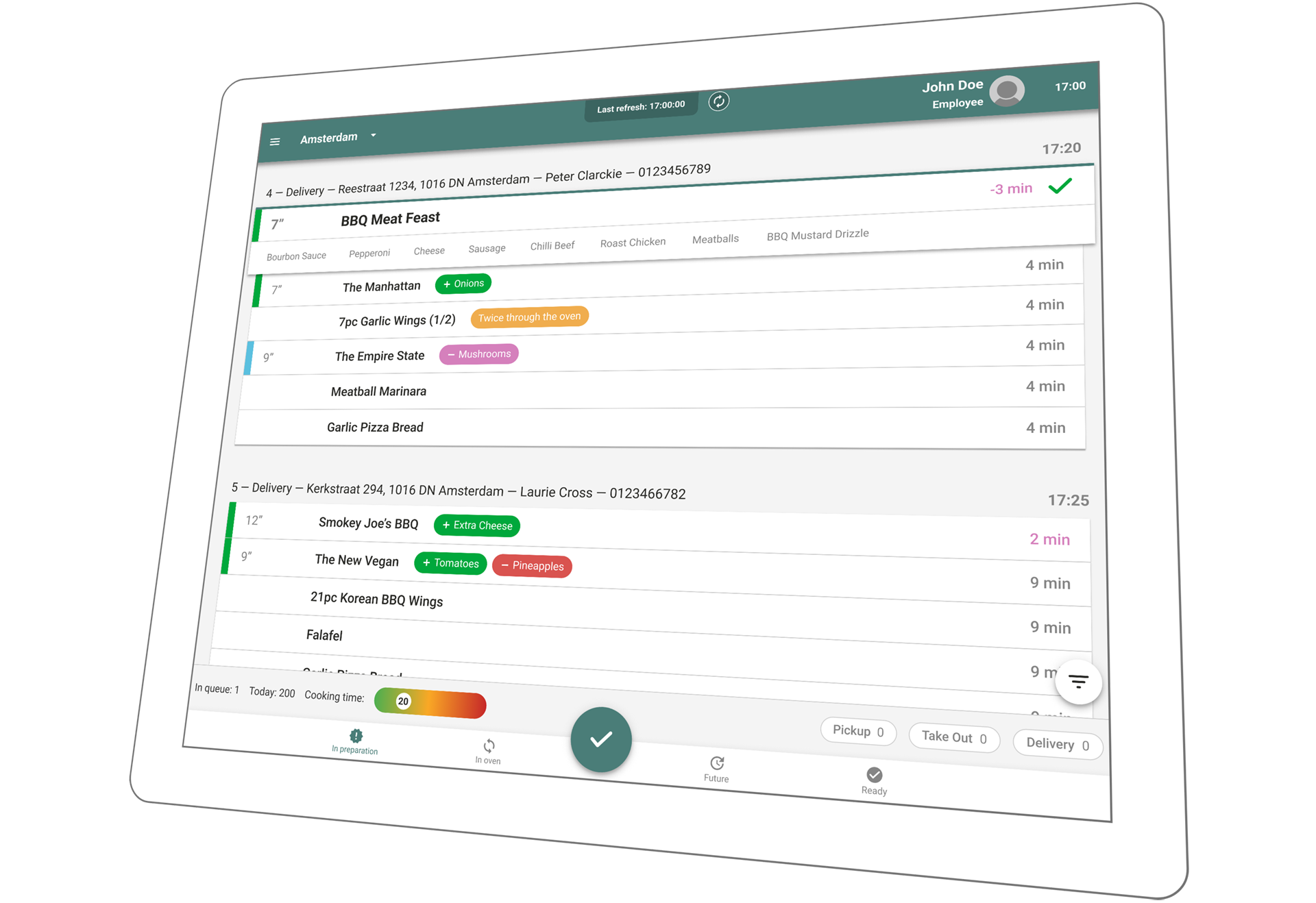
Save the right order of ingredients according to your recipes. Once configured, the KDS displays the correct order easy-to-see.
Our KDS supports color code and remarks configuration. This helps to see characteristics of dishes, such as special ingredients, warm or cold served dishes or removed and added items.
New orders and orders with a long waiting time trigger an audio notification to raise the attention of kitchen staff. The timer on each order indicates additionally how much time is left to prepare the order in time.
The KDS helps to stay on top of orders by offering filters. Prioritize orders and filter by delivery times or order types, such as dine-in, delivery, or pick-up.
Several remarks can be shown to give your kitchen staff the information they need during the preparation.
Information such as business accounts, new customer indications, third-party delivery orders, or customer notes are displayed in a visually structured way next to the standard order information.
The map view enables combining geographically related orders. A separate tab for future orders helps to stay informed about pre-ordered orders, whilst letting kitchen staff focus on current orders.
The clean and uncluttered design focuses on increasing efficiency by using smart color codes and ingredients order.
Thanks to the correct ingredients order and remarks section, the restaurant staff is onboarded faster and produces fewer errors. This reduces losses and increases order accuracy.
Automatic order prioritization helps your restaurant staff to focus on the fast and correct preparation of the orders rather than wasting time on planning.
Customers benefit from accurate order updates on the Website or Consumer App once restaurant staff changes the order status on the KDS.
Restaurant staff has the freedom to manually prioritize orders and change the preparation status accordingly. In that manner, geographically related orders can be strategically prepared and delivered together.
Whether to stay ahead of upcoming orders or quickly check in with customers on current orders. All required information can be found in one KDS.
Our restaurant chain software provides a stable and scalable e-commerce platform
Omnichannel approach
Incrementally increase
We turbocharge e-commerce for your restaurant chain and help you drive more orders.
Our omnichannel solution for restaurant chains provides you with operational control and continuous development to help your chain succeed.
Centralized power
Continuous Development
We provide real-time access to strategic insights and full ownership of data across the complete order and customer journey.
Preconfigured reports on
Custom reporting
Start gaining a comprehensive understanding of your business and make data-driven decisions to drive success how you define it.
Yes. Our system is fully integrated and displays orders from any aggregator of your choice. Orders from third-party delivery providers display a remark with the name of the provider for better order management.
Customers who ordered online follow the status of their order updates on your Website or Consumer App. You can also configure push notifications.
Yes. Color codes are customizable for the needs of your restaurant chain.
Get an introduction to our solution and find out how we can help you increase your revenue and save on commission. We can build a personalized business case catered to your restaurant chain
Joe Chemali
Sales
Equip your drivers with the tool to keep stores and customers informed about their exact location while delivering. Easy navigation and GPS improve efficiency throughout the whole order journey.
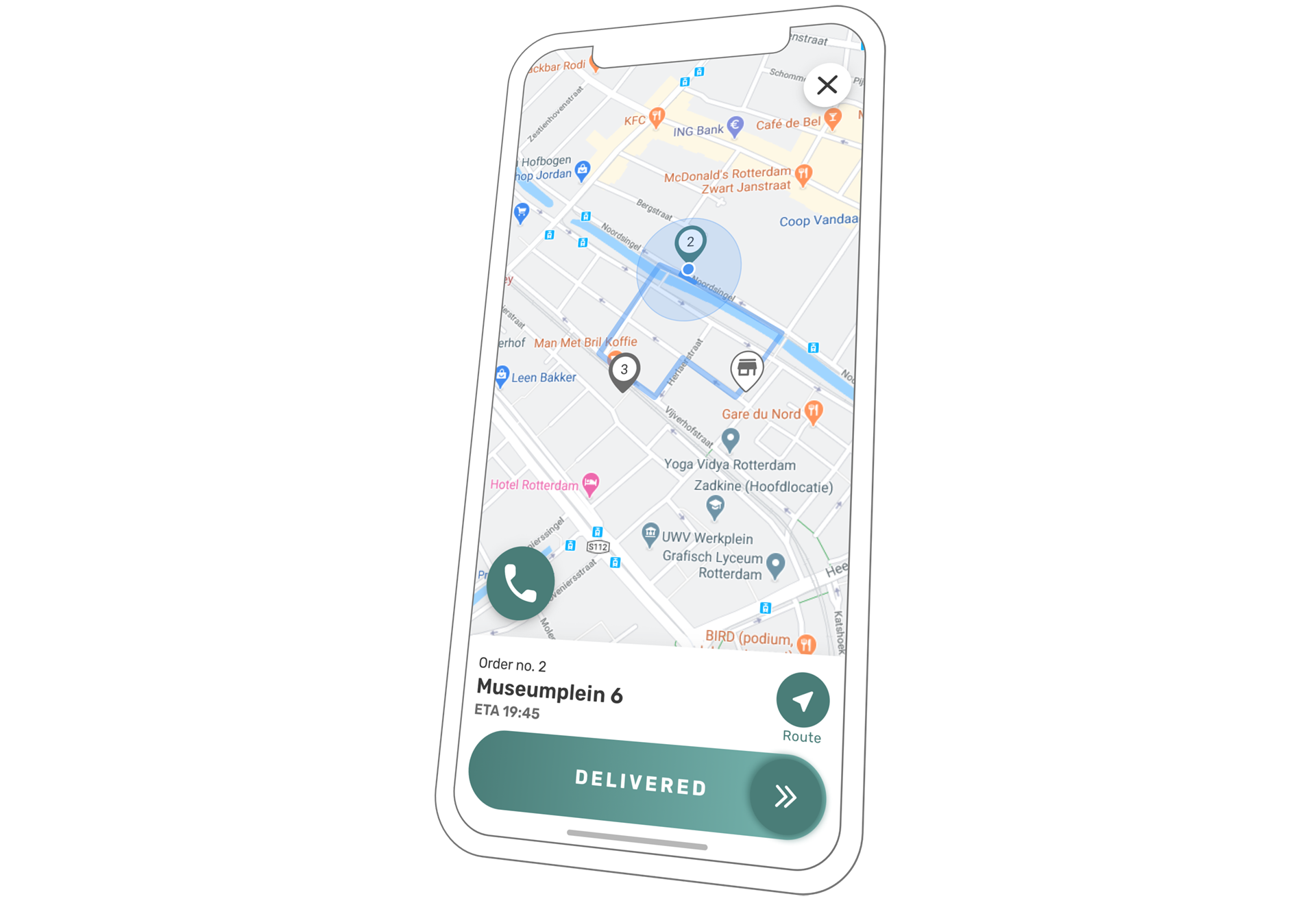
Drivers have an overview of all historical and future deliveries in the Driver App. Push notifications inform the driver about newly assigned orders on the go.
After the pick-up, drivers change the status of the order in the app to inform customers and colleagues about the order journey. Drivers swipe when it is delivered, so the store knows that the driver is on his way back.
GPS tracking allows customers to follow the delivery on the Website or Consumer App. Restaurant staff can track the delivery on the maps screen of the Dispatching Display.
The smart call functionality makes support easy. By clicking one button, drivers get in touch with either customers or the store depending on the order status of their delivery.
See the distance driven, orders per ride, the total amount of orders, and other key metrics. The report can be produced per driver or select multiple drivers.
The tracking provides full visibility of the order journey and an accurate estimated time of arrival (ETA) for customer and store teams.
Ride planning and order assignment are simplified when having your drivers in sight.
With the ability to track the complete order journey as well as receive fresh and efficiently delivered food, customers are more likely to become repeat customers.
The delivery tracking functionality on the online Website and Consumer App gives customers the autonomy to check their order status instead of calling the restaurant for an update.
Headquarters and Franchisees have access to delivery reporting and dashboards upon opening the Driver App.
Our restaurant chain software provides a stable and scalable e-commerce platform
Omnichannel approach
Incrementally increase
We turbocharge e-commerce for your restaurant chain and help you drive more orders.
Our omnichannel solution for restaurant chains provides you with operational control and continuous development to help your chain succeed.
Centralized power
Continuous Development
We provide real-time access to strategic insights and full ownership of data across the complete order and customer journey.
Preconfigured reports on
Custom reporting
Start gaining a comprehensive understanding of your business and make data-driven decisions to drive success how you define it.
The S4D Driver App can be downloaded by scanning a QR code in the POS. It is compatible with iOS and Android.
The delivery can be tracked on the Dispatching Screen. By choosing the map view the delivery route and position can be easily followed to plan the next order assignments.
Customers who ordered online follow the status of their order updates on your Website or Consumer App. You can also configure push notifications.
No. Drivers consent to the terms and conditions before downloading the Driver App onto their devices.
The delivery tracking is only active when a driver is delivering an order. The delivery tracking is not active as soon as the Driver App is inactive.
Our Driver App is optimized so that delivery drivers can easily use it on normal mobile phones. The battery usage is comparable with common navigation tools, such as Google maps.
Get an introduction to our solution and find out how we can help you increase your revenue and save on commission. We can build a personalized business case catered to your restaurant chain
Joe Chemali
Sales
Give your stores a tool to efficiently assign vehicles and delivery orders to your drivers. Provide customers with increased order accuracy and delivery of fresh food thanks to item reminders and delivery tracking.
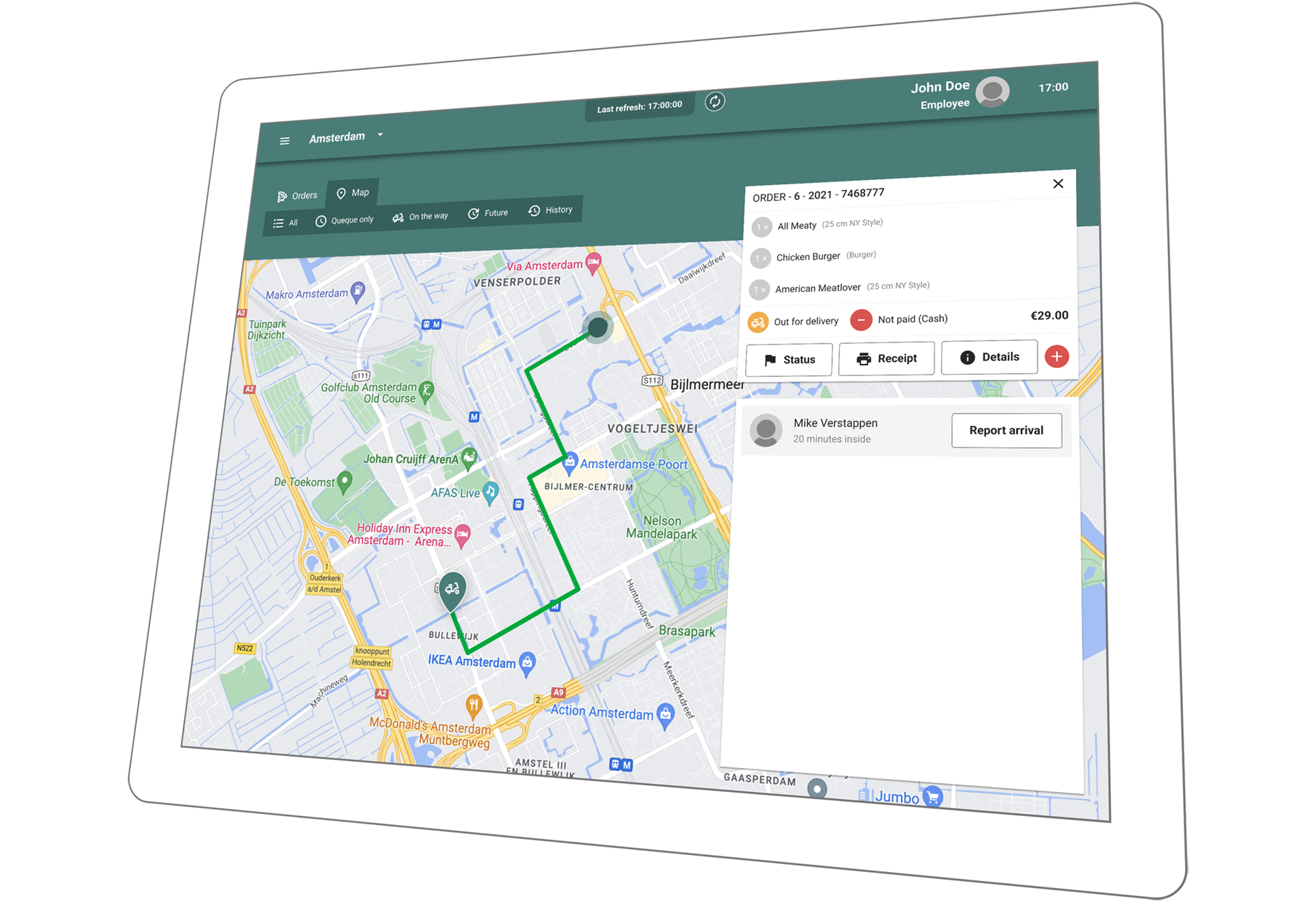
Keep an eye on all your orders. You can see queued orders, upcoming orders, or orders that are ready for delivery on one screen.
Manage rides and combine delivery orders efficiently in one ride via the map view.
After the order was placed, the order status and the payment method can be corrected. If an order needs to be canceled completely, the system offers the freedom to do so in a controlled manner.
You can switch on item reminders for products such as drinks, sauces, or ice cream which can get forgotten in the rush. The reminder pops up once the driver triggers the “leave now” button.
Oversee all drivers that are clocked in and assign orders and vehicles to drivers on one screen. You can pay out tips and manage expenses such as gas money. These can be assigned to drivers and tracked in an expense report.
With our Driver App, your drivers receive newly assigned orders on their phones and follow their status. Restaurant staff can follow the delivery on the map for an accurate ETA and manage the order assignment with foresight.
The combination of order information, easy driver management, map screen, and fleet tracking enables a structured way of order assignment and food delivery.
By combining orders on the same route you save time and fuel money. Plan upcoming rides for drivers on their way back to the store and reduce waiting time in the store.
Thanks to the decluttered design, order information can quickly be checked before leaving and item reminders ensure that the order is complete.
By being able to track the deliveries you can allocate drivers that do not change their location. In case of an accident, you can quickly locate the driver and get help.
Being able to combine rides and find the fastest routes your drivers are more efficient which reduces the need for additional drivers and additional fuel expenses.
The ability to edit order details and cancel orders keeps your accounting accurate and ensures higher customer satisfaction.
Our restaurant chain software provides a stable and scalable e-commerce platform
Omnichannel approach
Incrementally increase
We turbocharge e-commerce for your restaurant chain and help you drive more orders.
Our omnichannel solution for restaurant chains provides you with operational control and continuous development to help your chain succeed.
Centralized power
Continuous Development
We provide real-time access to strategic insights and full ownership of data across the complete order and customer journey.
Preconfigured reports on
Custom reporting
Start gaining a comprehensive understanding of your business and make data-driven decisions to drive success how you define it.
The route and ETA are calculated depending on the vehicle type that is assigned to your driver. In this way, we can find the fastest and most appropriate route for your driver and calculate an accurate ETA.
No. Drivers consent to the terms and conditions before downloading the Driver App onto their devices.
The delivery tracking is only active when a driver is delivering an order. The delivery tracking is not active as soon as the Driver App is inactive.
Customers who ordered online follow the status of their order updates on your Website or Consumer App. You can also configure push notifications.
Yes. The Dispatching Screen is seamlessly integrated into all your S4D systems. Orders from third-party delivery platforms show as such on your Dispatching Display.
Partners have a dedicated Customer Success responsible to ensure a smooth partnership.
In addition, we offer support via WhatsApp chat, email, and phone seven days a week. Our support agents are trained to speak various languages to help in an efficient manner.
Get an introduction to our solution and find out how we can help you increase your revenue and save on commission. We can build a personalized business case catered to your restaurant chain
Joe Chemali
Sales
S4D provides easy and structured integration with third-party delivery providers to serve your customers from the platforms of your choice.
All online orders are sent to the S4D POS as the central piece of your all sales channels. Stores do not require additional hardware devices, such as tablets, for each third-party platform.
All orders are displayed in the KDS, with the additional information from which third-party platform the orders have been placed.
Operational reports provide you with all expenses and earnings to analyze revenue structure achieved through third-party delivery.
All orders flow into the S4D system. There is no more need to split screens or have additional tablets.
Gain insights into where the revenue streams come from to adjust marketing and gain more direct sales.
Professionally integrated systems and accurate menu management ensure that the amount of lost orders is reduced.
Connect with consumers on the online food delivery channel of their choice and convert them into loyal repeat customers.
Our restaurant chain software provides a stable and scalable e-commerce platform
Omnichannel approach
Incrementally increase
We turbocharge e-commerce for your restaurant chain and help you drive more orders.
Our omnichannel solution for restaurant chains provides you with operational control and continuous development to help your chain succeed.
Centralized power
Continuous Development
We provide real-time access to strategic insights and full ownership of data across the complete order and customer journey.
Preconfigured reports on
Custom reporting
Start gaining a comprehensive understanding of your business and make data-driven decisions to drive success how you define it.
No, orders will be integrated into the restaurant POS and prioritized on the Kitchen Display Systems.
Yes. For ease of working and adequate reporting, third-party delivery orders are marked as such in the Point of Sale, Kitchen Display System, and Delivery Systems. This helps restaurant staff to manage orders efficiently. Moreover, it helps headquarters to analyze third-party orders and direct orders in reports.
Get an introduction to our solution and find out how we can help you increase your revenue and save on commission. We can build a personalized business case catered to your restaurant chain
Joe Chemali
Sales